Lesson 6: Geospatial Data
Lesson 6: Geospatial Data jib18Lesson Overview
Lesson OverviewIn this module, you be learning about some of the different types of geospatial data including open data (as opposed to proprietary data), geospatial big data, real-time data, and volunteered geographic information/citizen science/crowdsourced data. Although all of these concepts will be introduced to you, all the data sources may not apply to your specific geospatial design.
In this assignment, you will be describing the data sources included on your geospatial design, including the source of the data, spatial information, collection methods, and citations/links. You will also discuss the data as it relates to open/proprietary, big data, real-time data, and/or VGI/crowdsourced data.
Objectives
At the successful completion of this lesson, students should be able to:
- Find and describe the geospatial data that will be displayed in the geospatial design
- Create a table that shows the features of the data, including spatial information, collection methods, and citations/links.
- Describe the data as it relates to open/proprietary, big geospatial data, real-time data, and/or volunteered geographic information/crowdsourced data (where applicable)
Assignments
| Step | Activity | Directions |
|---|---|---|
| 1 | Work through Module 6 | You are in the Lesson 6 online content right now. Be sure to carefully read through the online lesson material. |
| 2 | Assignment | Complete the Data Assignment:
|
| 3 | Technology Discussion | No technology discussion |
Open Data Standards
Open Data StandardsOpen Data Types
Open data are any data that are free and accessible to the user, without restrictions on access or rights of use. The open data standards are set by the Open Geospatial Consortium (OGC), which was founded in 1994 in response to government and industry demand to solve the issue of spatial data sharing and interoperability.
Open Data relies on the FAIR (Findable, Accessible, Interoperable, and Reusable) principles, which aims to make data reusable and accessible.
Some of the key OGC standards are briefly outlined here:
- Simple Feature - this is one of the OGC's earliest standards. It defines what a geographic feature is (at a minimum a point, line or polygon) and then sets out a common format for text and binary representations of geographic features. The "simple" refers to the lack of topology in the data structure, often called spaghetti data. This standard promotes interoperability as, if one program exports its data in either Well-Known Text (WKT) or Well-Known Binary (WKB), then it is easy for another program to read in the same data and know what it meansGeographic Markup Language (GML) is an extension of XML schema (or grammar) for the expression of geographical features. It is used as an interoperability format for features that are too complex to express using the Simple feature standard. It is used particularly by Web Feature Service (WFS).
- KML - was developed as a competitor to the OGC's GML, but it is now one of the more well known of the OGC's standards. It was originally developed by Keyhole (that's the K) and then popularized by Google's Google Earth application. It was donated to the OGC in 2007 to be developed as an open standard for 2 and 3D map annotation.
- UML- This is an open and standardized way of representing programming and modeling entities, their properties and their relationships, and formulating their parameters and actions. It can be used to diagram out a programming task and some types of the software can write part of the code. It is related to Esri Model Builder and to their Model Diagrams, e.g. Esri Biodiversity Conservation.
- Web Mapping Service (WMS) - WMS was one of the first OGC standards and set the basis for all web mapping for many years.
- Web Feature Service (WFS) - this is the standard that a service has to conform to if you want to serve geographic features over the web.
- Web Coverage Service (WCS) - the WCS standard defines an interface and operations to access geographic coverages (rasters) over the web.
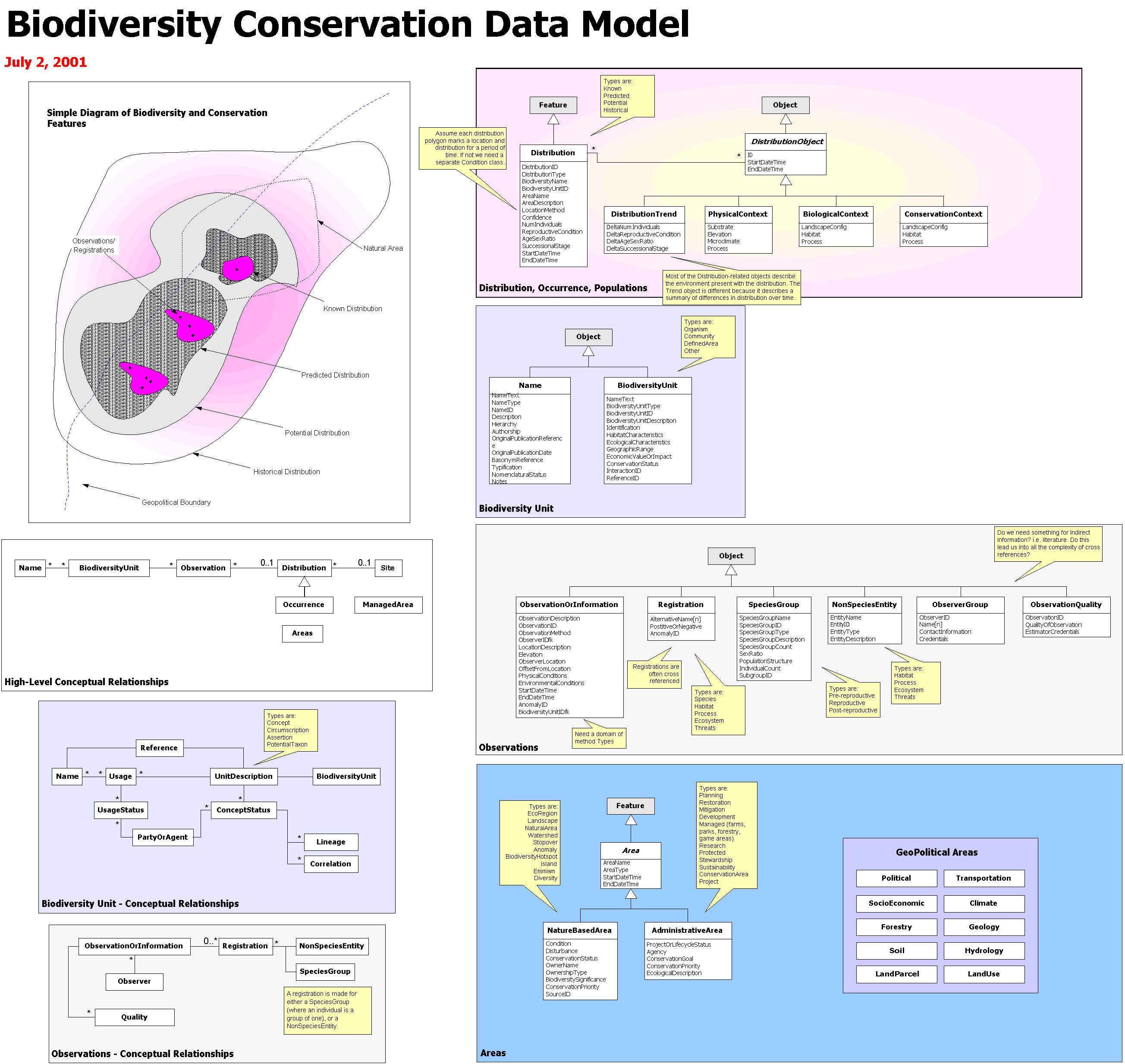
Open Data Sources
Open Data SourcesThree different types of Open Data will be described here: Data contributed by volunteers, data published by public administrators, and open scientific geospatial data (Coetzee, 2020).
Volunteered Data
- User Generated Content: material that is contributed by the public to a website
- Crowdsourcing: enlisting a large number of people, either paid or unpaid, to collect information
- Citizen science” data about the natural world is collected by the general public for analysis by professional scientists
- Community science: communities participate in the design and planning of data collection
Several different Open Data Sources are popular and well implemented in different geospatial designs, including:
- Google Maps
- Wikimapia
- OpenStreetMap – OpenStreetMap is a particularly well-known open data source, with a community of 5.5 million users and 4000-5000+ active daily users.
Authoritative Open Geospatial Data
Authoritative open data are generally provided by federal and local governments to share administrative boundaries, place names, building footprints, street centerlines. Several authoritative data sources include:
Open Scientific Geospatial Data
Open Scientific Data was first implemented over 50 years ago, when the International Council for Science (ICS) recognized the need for universal and equitable access to scientific data. However, finding Open Scientific Data is a little more nuanced, since it is journal-specific.
References:
Coetzee, S., Ivánová, I., Mitasova, H., & Brovelli, M. A. (2020). Open geospatial software and data: A review of the current state and a perspective into the future. ISPRS International Journal of Geo-Information, 9(2), 90.
Volunteered Geographic Information/Crowd Sourcing/Citizen Science
Volunteered Geographic Information/Crowd Sourcing/Citizen ScienceVolunteered Data can be classified (according to the reading below) into four categories based on framework (collected by the government), non-framework (collected by citizens), collected actively (campaigns that call for participation), or collected passively (geotagged information is provided willingly through apps and social media).

A four-quadrant diagram categorizing data types by collection method and framework
Four quadrants, created by two intersecting axes. The horizontal axis represents Framework Data on the left and Non-framework Data on the right. The vertical axis represents Passive Data Collection at the bottom and Active Data Collection at the top.
Top-Left Quadrant: Framework Data + Active Data Collection
This quadrant lists data sources that are actively collected and part of a framework:
- Feature mapping: Includes addresses, buildings, elevation, points of interest, protected areas, rivers and canals, and road and rail networks.
- Hiking and biking trails: Routes and trails for outdoor activities.
- Gazetteer: Geographic dictionaries or indexes.
- Cadastral parcels and other land administrative data: Information related to land ownership and boundaries.
- Land cover/Land use: Descriptions of how land is used and its surface characteristics.
Top-Right Quadrant: Non-framework Data + Active Data Collection
This quadrant focuses on non-framework data that is actively collected:
- Weather: Includes data from amateur weather stations, snowfall, and avalanche reports.
- Environmental monitoring: Covers air and water quality, fracking, waste, and noise levels.
- Biodiversity: Features species identification and geo-tagged wildlife images.
- Disaster events: Information about natural and manmade disasters.
- Crime/Public safety: Data related to criminal activities and public safety measures.
Bottom-Left Quadrant: Framework Data + Passive Data Collection
This quadrant includes framework data that is collected passively:
- Transport: Data from road networks, satellite navigation systems, traffic data from services like TomTom, and Google traffic.
- Feature mapping by Google via their game Ingress: A gamified way to gather geographic and feature data.
Bottom-Right Quadrant: Non-framework Data + Passive Data Collection
This quadrant lists non-framework data collected passively:
- Google search data: Information derived from users’ search behavior.
- Transport: Live feeds from buses, trains, and metro systems.
- Mobile data/behavior: Information from store purchases, customer survey data, and mobile phone usage patterns.
- Location-based social media: Data from platforms like Foursquare, Twitter, and Facebook.
- Places of interest/travel: Includes geo-tagged photos, videos, stories, and travel advice.
Overall Structure
The quadrants illustrate how data collection methods and types vary depending on their alignment with a framework and the level of activity or passivity involved in their collection. The top quadrants represent active collection methods, while the bottom quadrants represent passive ones. Similarly, the left quadrants are more structured and formalized (framework), while the right quadrants are less structured (non-framework).
Volunteered Geographic Information can, at its most basic, be defined as geotagged data contributed by citizens, whether map-based or where location is simply an attribute in a much larger dataset. A very well-known VGI dataset, as mentioned previously, is OpenStreetMap. However, many other datasets exist, including:
- WAZE: a geospatial map, where users can place warnings for other users including police cars, traffic, potholes, and other road features
- Yelp, TripAdvsior, and other review-based apps: Leaving reviews of georeferenced stores/restaurants provides volunteered geographic data
- Survey123 is a great resource for volunteered geographic information and can include a variety of data sources including trail maintenance, lost dog and/or lost person tracking, wait lines, and many other.
Citizen science, as mentioned, is data that is collected by citizens that can be used by professional scientists for analysis. Many citizen science projects exist include:
- The Audubon Christmas Bird Count
- iNaturalist – an app where people can take pictures, identify, and geolocate animals and plants, which are then confirmed by a professional (in some cases). The confirmed cases can be used for scientific purposes
- EDDMapS (Early Detection and Distribution Mapping System) is a citizen science initiative to track invasive species
- Bumble Bee Watch: allows users to track and conserve bumble bees by uploading images and sharing information
- eBird: Users can take pictures of bird species, which allows scientists to track populations
See the reading below for more specific examples of VGI, crowd sourced, and citizen science initiatives.
References:
Geospatial Big Data
Geospatial Big DataGeospatial Big Data are becoming more prevalent as data collection methods can collect data on the sub time frames such as seconds, minutes, days, and weeks, over a long time, now nearing 30+ years, since the start of the internet era and before for some datasets. However, there are additional hurdles to understanding big data including where to find it and how to display it effectively for users.
Raster Data
Big raster datasets are becoming more prevalent through data collection methods such as Unmanned Aerial Vehicles (drones), satellites, VGI images collected through apps and social media.
Points, lines, polygons
Points, lines, polygons, and other vector data are becoming more prevalent as artificial intelligence and machine learning is automating the process of converting raster images to vector images. AI/ML has the ability to automatically identify street sign, road ways, rivers, buildings, among others and automatically digitize them; a process that historically would have taken 10s-100s of hours.
Additionally, smart phone data collection can submit points such as locations of transportation issues, field surveys, trail maintenance, buildings, and many more, all over the world, leading to hundreds and thousands of potential vector points every day.
Although many more examples of big vector data exist, a last example is geotagged social media posts, which can be extracted using AI/ML to provide innumerable amounts of data including collective emotional responses, human migration, updates on wartime and locational events, among others.
Your Turn
While you’re reading this, think about how you can or have used big data in your personal, professional, or this term project.
Real Time Geospatial Data and Internet of Things
Real Time Geospatial Data and Internet of ThingsThe Internet of Things (IoT) describes items that are connected to each other with the internet, such as objects, devices, sensors, and everyday items. An example is a smartwatch and an app, which can communicate using Bluetooth or the Internet.
The internet of things has transformed the way that data is collected, making data collected in near real time now, leading to massive data collection and “geospatial big data” analysis. The Internet of Things that we are most familiar with are internet-enabled appliances, home automation components, internet-based security systems, among others. However, the Internet of Things has been implemented in other disciplines too, including networked vehicles, intelligent traffic systems, and others.
The IoT has allowed for the real-time collection for a variety of scientific disciplines including humanities (as mentioned above), hydrologic monitoring, emergency response and disaster management, traffic flow monitoring, education, sustainability, and many more.
Note the places in this table from Rose, 2015 that shows where IoT can (or has already) started automating life.
| Setting | Description | Examples |
|---|---|---|
| Human | Devices attached or inside the human body | Devices (wearables and ingestibles) to monitor and maintain human health and wellness; disease management, increased fitness, higher productivity |
| Home | Buildings where people live | Home controllers and security systems |
| Retail Environments | Spaces where consumers engage in commerce | Stores, banks, restaurants, arenas – anywhere consumers consider and buy; self-checkout, in-store offers, inventory optimization |
| Offices | Spaces where knowledge workers work | Energy management and security in office buildings; improved productivity, including for mobile employees |
| Factories | Standardized production environments | Places with repetitive work routines, including hospitals and farms; operating efficiencies, optimizing equipment use and inventory |
| Worksites | Custom production environments | Mining, oil and gas, construction; operating efficiencies, predictive maintenance, health and safety |
| Vehicles | Systems inside moving vehicles | Vehicles including cars, trucks, ships, aircraft, and trains; condition-based maintenance, usage-based design, pre-sales analytics |
| Cities | Urban environments | Public spaces and infrastructure in urban settings; adaptive traffic control, smart meters, environmental monitoring, resource management |
| Outside | Between urban environments (and outside other settings) | Outside uses include railroad tracks, autonomous vehicles (outside urban locations), and flight navigation; real-time routing, connected navigation, shipment tracking |
References:
Lwin, K., Hashimoto, M., & Murayama, Y. (2014). Real-time geospatial data collection and visualization with smartphone. Journal of Geographic Information System, 2014.
Lesson 6 Reading Assignment
Lesson 6 Reading AssignmentIn the first set of readings, you will be introduced to a detailed explanation of scenario-based design and persona mapping, which are both necessary for understanding your user designs. You will use the content found in these readings to construct the user analysis section of your design proposal. The third article outlines the context necessary for developing needs assessment questions to solicit user feedback before developing the design, either through surveys, discussion posts, both, or another feedback method. The final article is optional if you would like to explore the National Centers for Environmental Information Experience Builder.
Optional Read about Big Data
Think About:
This article discusses geospatial big data including the big data sources (which is available in the module content), as well as big data challenges and opportunities. If you are interested in exploring geospatial big data, read and/or skim this article, particularly section 3. Data collection. While you are reading, think about how you can use geospatial big data in your own project.
Optional Read about Volunteered Geographic Data/Citizen Science/Crowd Sourced Data
Think About:
This book chapter discusses the definition and sources of VGI data. Some of the information has been provided in the module content, but the book chapter provides a lot more VGI sources. While you are reading, think about how you can use the VGI sources listed in this chapter for your own project.
Optional Reads about Real Time Data and Internet of Things Articles
Think About:
These articles discuss real time data, the application of real time in a geospatial design, and the integration of real time data with Internet of Things. An explanation of the Internet of Things has already been presented in the module content, however, these articles provide additional resources for understanding how IoT can be used with real time geospatial data.
Optional Read about Open Data
Think About:
This article discusses the different open data sources. Some of the information is provided in the module content, but the article provides more specific information regarding data accuracy and availability. While you are reading, consider how you may use open data in your own project. Which type of open data could you use – VGI, crowd source, citizen science, scientific open data, government open data, or any other type?
Term Project: Data
Term Project: DataThere are many different types of data sources a designer can implement in a GISystem including licensed, open-source, and/or open core options. Additionally, a designer can choose volunteered data, scientific data, and/or big data. It is the decision of the designer what data and software to use to house and populate the map. Indeed, we often say that people are the most important part of a GISystem – there is no dispute about this. However, we also often minimize the data requirements with the assumption that it will be available. It goes without saying that GISystems require correctly collected and appropriate data for the application, or the system will produce faulty output. This assignment is an opportunity to consider the data you use in your design and address its issues such as consistency, redundancy, efficiency, and accuracy.
This week, you will:
- Find and describe the geospatial data that will be displayed in the geospatial design
- Create a table that shows the features of the data including spatial information, collection methods, and citations/links.
- Describe the data as it relates to open/proprietary, big geospatial data, real time data, and/or volunteered geographic information/crowd sourced data (where applicable)
Once you are ready, move to the Lesson 6 Term Project: Data.