Advising and Course Planning
Advising and Course Planning szw5009Lesson Overview
Lesson OverviewBy now, hopefully you've been in touch with your World Campus adviser! If you haven't reach out immediately.
What will we learn?
By the end of this Lesson, you should be able to:
- Contact your adviser;
- Understand the degree requirements; and
- Plan semester courses
What will be due?
Refer to the Activities page for more information on the assessments for this lesson.
Questions?
If you have any questions, please post to the "EMSC 302 Assignment/Lesson Questions?" discussion forum or e-mail the instructor (if the question is personal in nature).
Advisers and Advising
Advisers and AdvisingAdvisers and Advising: Who is your adviser?
If you don't already know who your adviser is, you can find their name in Lionpath or Starfish.
You should have learned a lot about your academic responsibilities vs. your adviser's responsibilities in the New Student Orientation's, Academic Advising module. Academic Advisers are here to help you navigate the ESP degree requirements, but they are not experts in:
- Financial aid
- Tuition bills
- Reading your mind
How can your adviser help you?
Your adviser can't help you if they don't know you need help! Reach out and communicate with your advisers regularly, that is what they're here for! To make sure you’re on track for meeting your degree requirements, we recommend contacting your adviser at least once a semester, and in any instance that you have questions about your degree, transfer credits, dropping a course, etc. You can learn more on the Acadmic Advising, Undergraduate Students page.
Plan accordingly:
If you wait until the week before classes start, or the first week of the semester, you may not hear back from your adviser until after the drop/add deadline has passed. So, get in touch early - when registration opens so that you have plenty of time to make decisions and changes to your schedule!
How to contact your adviser:
Penn State policy dictates that advising matters should only be discussed using Penn State email addresses. Therefore, you should always use Starfish or your @psu.edu email when contacting your adviser.
Tools
When you were admitted to the program, your adviser should have provided you with a checksheet listing all of the required courses for the ESP program. If you did not receive this, it is possible that it was sent to your personal email address or your PSU email before you had it set up. If you do not have the checksheet file, please contact your adviser immediately and ask for a copy.
A note on transfer credits:
If you run an Academic Requirement Report using Lionpath, chances are it will not understand how to use your transfer credits and therefore, won't adequately reflect your standing. You should double-check your checksheet and the Lionpath Academic Requirement Report to ensure that all of your prior coursework is showing. If there is missing information, please contact your adviser immediately!
*All students need to complete 120 credits to earn the ESPBA or the ESPBS degree. Completing all the courses listed on your checksheet alone, will not ensure your graduation, a total credit count is also required. Talk to your adviser about your total credit count. It is possible that your transfer credits will make up the difference. If not, you may want to consider picking up a minor while completing the 120 credit requirement.
Advisers & Advising, cont.
Advisers & Advising, cont.Advisers & Advising: Communicating with your Adviser
There's no such thing as a dumb question or "being a bother". Your adviser needs to hear from you so that they can help you. If you have an advising-related question, email using your Penn State email account (Outlook) or schedule a time in Starfish to meet. Either are preferraable routes of initial communication, because that way your adviser can have some time to look up your record and better understand your situation. If you call and ask a question, it may be harder for your adviser to give you a thorough response. Starfish and email interactions allow advisers to keep an accurate record of communications and it also gives you something to refer back to if needed.
At a bare minimum, you should check in with your adviser before every semester, so they can confirm the courses you intend to take will keep you on the most efficient path to graduation.
In your emails/communications with your adviser, you should:
- Always include a clear and relevant subject line (e.g. "Question regarding SP27 scheduling" or "Update on my transfer courses from HACC")
- Address your adviser as instructed. (for some reason people think it's okay to address emails unprofessionally, like "Prof" or "Hey" -- hint: it's not okay)
- Use a greeting, punctuation, and capitalization. Always.
- Use full course names or numbers when referring to classes. When you say things like "That EGEE course I'm taking" that is not enough information.
- Be clear, specific, and to the point.
- If you'd prefer to talk on the phone or on Zoom about the matter, state such in your email.
- Be patient. Every adviser has other advisees that are equally important, therefore a same-day response may not be possible.
Other items to consider:
- Advisers are usually very responsive to their advisees, typically responding within 48 BUSINESS hours. If it's been a few days, and you haven't heard from your adviser, please feel free to follow up!
- Check your Penn State email regularly. At least 3 times a week.
Penn State World Campus Academic Advising
Hours (Eastern Time): Monday–Friday: 8:00 a.m.–5:00 p.m.
Saturday–Sunday: Closed
Make an appointment in Starfish
Phone: 814-863-3283
Academic Advising contact form
Alternative ways to earn credit
Alternative ways to earn creditLooking to earn credit for prior knowledge of a subject? You have several options outlined below. Once you've evaluated your options, be sure to check with your adviser to confirm next steps!
CLEP (College-Level Examination Program)
You can earn credit for courses by taking a CLEP exam. CLEP exams provide you with an opportunity to demonstrate your existing knowledge and earn credit for prior learning. You may have learned about applicable topics by completing an independent study epxiernce, prior coursework (that didn't transfer in), on-the-job training, professional development, cultural pursuits, or internships.
CLEP Costs
CLEP exams are now available online! These typically cost about $100-$145, depending.
CLEP Exam Subjects Available
- business,
- humanities,
- foreign languages,
- history and social sciences, and
- science and mathematics.
For a complete list, visit the Penn State Credit from CLEP Exams page.
Typically CLEP exams take 90 minutes to complete.
Military and Veteran Students
CLEP exams are free for eligible military personnel and eligible civilian employees. You can learn more about that at the CLEP Military Benefits page on the CLEP site.
You can read more about how to get credit for your military schooling and DANTES/DSST testing on the Credits for Military Experience page.
Note
Both CLEP exams are multiple choice and administered on a computer.
Credit by Validation
If you completed coursework in a non-accredited institution and the course credits were rejected by Penn State, you may be able to complete the credit by validation process to earn credit for those courses. Read more about that at Undergraduate Admissions' Credit by Validation page.
Credit by Examination
World Campus students can earn additional credits to fulfill degree requirements through successful completion (C or better) of a comprehensive examination, which is a substitute for completing the usual requirements of a course. Please note that this option is only available to students who have already completed at least one Penn State course for 3 or more credits. Contact your adviser for the application form needed and further instructions.
Prior Learning Assessments
Prior Learning Assessment (PLA) is how Penn State determines whether knowledge gained outside of the traditional academic environment is at the college-level and worthy of college credit. For more information and to see if your experience qualifies for PLA, and you can complete a portfolio for assessment, visit Penn State’s Prior Learning Assessment website. Your adviser can tell you if credits obtained through PLA will apply to your degree program.
AP Credits
In order to see if you have earned Penn State credit based on your AP test performance, please search the list found on the Credit from Advanced Placement Exams page.
Required ESP Courses
Required ESP CoursesI know that there's a lot of info in a lot of places and you've been bombarded with info since starting with us. We've done our best to minimize the amount of clicking around that you have to do by providing program-related information on the student.worldcampus.psu.edu website. When you visit the page, scroll down and look for the "Select Program" button (which is now blue). See screenshot below:

Choose ESP - there's a BA and a BS option. Make sure you choose the program in which you're enrolled!
On the Courses page, there is a table called "Prescribed Courses (62 credits) and Additional Courses (6 credits)" (see screenshot below). All of the required ESP core courses are listed here. Note that there are differences between the BS and BA degree, outlined below.

BS vs BA
The core course requirements and the Gen Ed requirements are the same for both versions of the ESP degree. However, there are differences in the other coursework. They are outlined below:
BA
- Electives
- 8 credits
- "Bachelor of Arts Degree Requirements"
- 12 credits of Foreign Language
- 9 credits of B.A. Fields"
- 3 credits of "Other Cultures"
Course and credit details can be found on the Courses page for the BA Degree.
BS
- Electives
- 11 credits
- "Supporting Courses"
- 6 credits in Energy and Science
- 6 credits in Analysis and Technology
- 6 credits in Business and Management
- 3 credits in Ethics, Leadership, and Communication
Course and credit details about the BS degree can be found on the BS Courses page.
If you have questions about which ESP degree is right for your career aspirations, talk with your adviser!
Course Planning

In order to see when courses are typically offered, you can visit the Lionpath course search page and search for the courses listed on the Course List page for your major.
Summer offerings only
EBF 200: Intro to Energy and Earth Science Economics is only offered during the summer semester. If you're unable to complete this class in the summer for financial aid reasons, please contact your adviser to discuss alternatives.
Prerequisites
Several courses in ESP have pre-requisites, meaning you need to complete the prerequisite courses before you can enroll in the required ESP course. Most prerequisites are also required for the major, but make sure you check what the prerequisites are before scheduling a course. If you enroll in a course and you do not meet the prerequisites, you will be booted from the course the first week of the semester, and it's usually too late to then get into a different class that you need! To double check the prerequisites for your courses, you can see them in Lionpath when you register or if it's outside of a registration period, you can use the Course Bulletin.
Credit for all screenshots: © Penn State is licensed under CC BY-NC-SA 4.0
Creating a Roadmap
Creating a RoadmapYou can use the tools we reviewed in this lesson to formulate a long-term academic plan. Here's how:
Step 1
Use your check sheet (like the one pictured below) from your adviser to understand what courses you still need to complete.

Step 2
Use the Course Search function in Lionpath to understand when the courses you need are offered.

Step 3
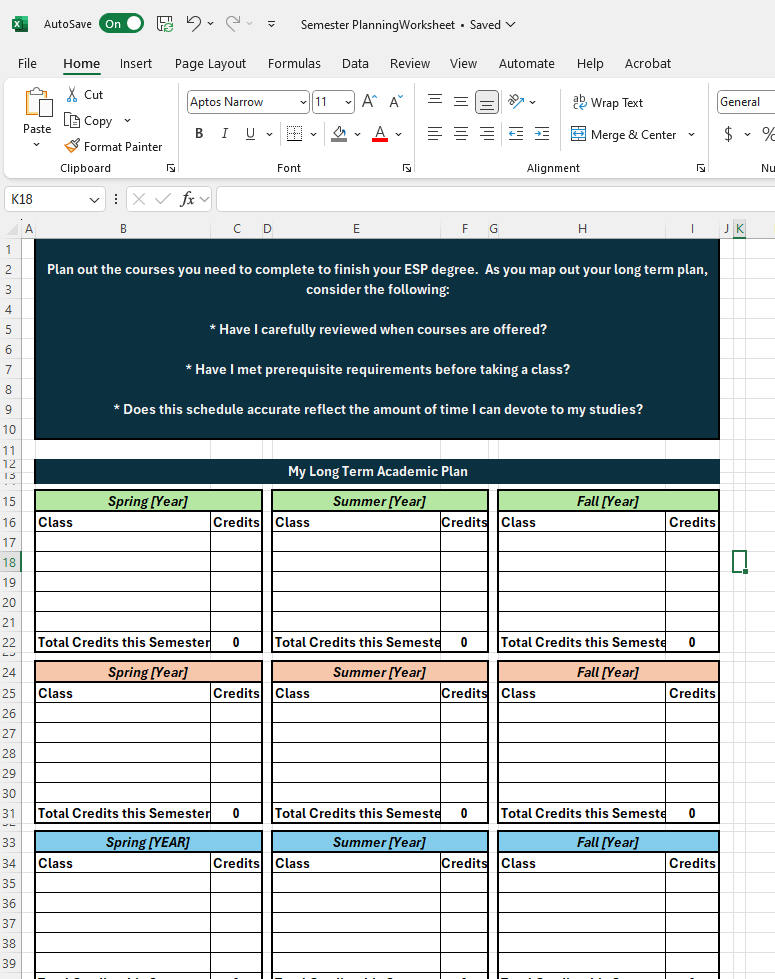
Use the information to then make a "plan" for the next two semesters. You are provided an Excel document on the Activities page to complete.
Step 4
Check the Bulletin to make sure you've completed the prerequisites listed for the courses you're planning to complete over the next two semesters.

Credit for all screenshots: © Penn State is licensed under CC BY-NC-SA 4.0
Activities
Activities| Requirement | Assignment Details |
|---|---|
| Submit | Use the tools outlined in the lesson to submit a long term academic plan. Make sure to do all the items below to earn full credit!
Additionally, when you're writing in the courses you want to take for the Gen Ed or Supporting Category courses, be sure to designate what requirement the course will fulfill. For example: ART 100 (GA) or EBF 301 (Business and Management).
** You will not pass the assignment if you do not submit the plan to your adviser! I will check in with them to confirm that they received it. |
Summary
SummaryYour adviser is one of a team of people that want to see you succeed at Penn State! We are available to answer questions, but we can't do that unless we hear from you!
Get in the habit of contacting your adviser every time registration opens, at a minimum. It's your responsibility to make sure you complete your degree requirements, but they are here to help you navigate the process!
References
ReferencesPenn State. "What Are Digital Badges" Accessed December 5, 2023. http://sites.psu.edu/informationliteracybadges/digital-badges/
Penn State. Penn State Digital Badges. The Penn State Badgesapp platform has been decommissioned as of 3/31/23. There is no replacement system at this time. Accessed December 5, 2023. https://badges.psu.edu/